
Speaking smoothly on camera is not easy, especially when your script is long. A teleprompter for camera helps you read text while keeping direct eye contact with the lens. It improves confidence, reduces mistakes, and saves editing time. That is why it has become a common tool for creators and video teams.
This article explains what it is, the two main types, how to use it, and who should consider buying one.
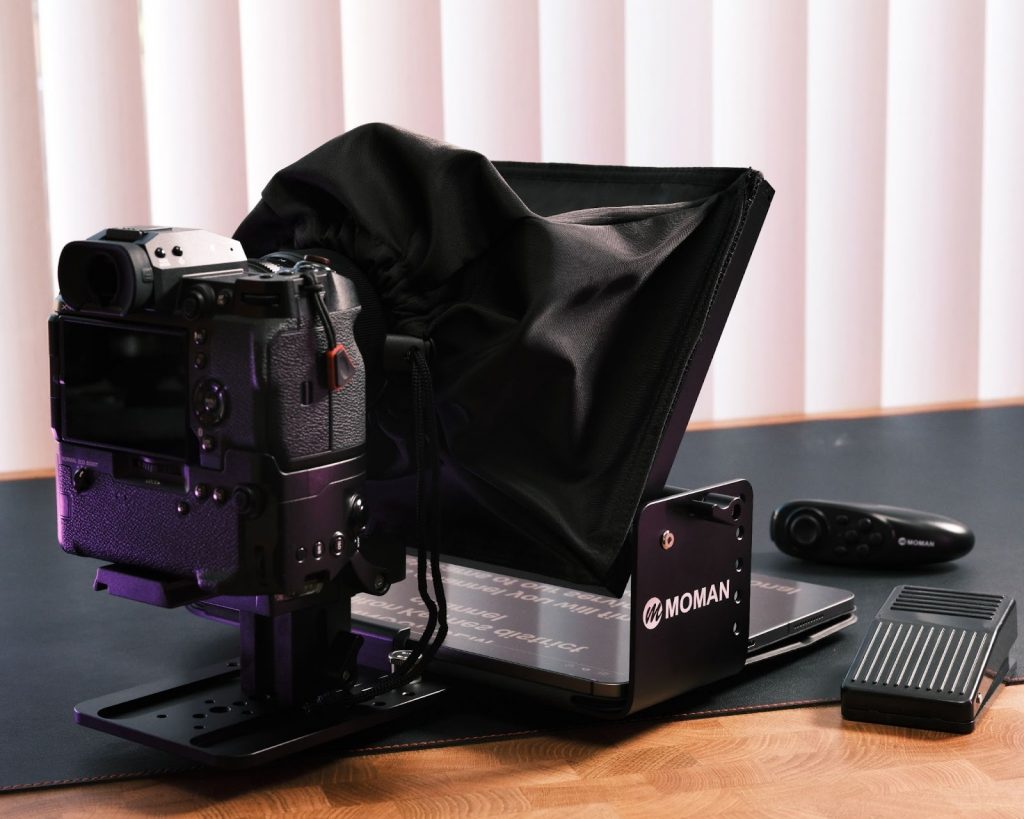
Source: Moman
Table of Contents
What is a teleprompter for camera
A teleprompter for camera is a device that reflects scrolling text in front of your camera lens. It uses beam splitter glass placed at a 45 degree angle. The text reflects on the glass, but the camera records through it. This allows you to read naturally without looking away from the audience.
There are two main types based on the camera you use: for phone cameras and for DSLR or mirrorless cameras.
Teleprompter for phone camera
A teleprompter for phone cameras is designed for smartphone creators. It is lightweight, easy to set up, and often works with a phone or small tablet to display text.
This type is ideal for vloggers, short video creators, and online coaches. It is affordable and portable, making it a good option for beginners or small teams.
Teleprompter for dslr camera
A teleprompter for dslr cameras is built for larger cameras. It supports heavier equipment and usually allows bigger screens for script display.
This version is more stable and suitable for studio recording, interviews, corporate videos, and online courses. If you care about image quality and professional results, this type is more suitable.
How to use teleprompter with camera
Using a teleprompter correctly can greatly improve your on-camera performance. If the setup is wrong, viewers may notice eye movement or poor framing. Below is a clear guide that covers both setup steps and practical speaking tips.
1. Setup steps
Setting up a camera mounted teleprompter is simple if you follow the correct order.
Step 1: Mount the teleprompter securely
Attach the teleprompter frame to your tripod or light stand first. Make sure it is stable before adding the camera. A loose base may cause shaking during recording.
Step 2: Attach your camera behind the glass
Install your camera directly behind the beam splitter glass. The lens should be centered in the opening. This correct teleprompter camera position ensures natural eye contact.
Step 3: Install the script display device
Place your phone or tablet into the holder below the glass. This is usually part of the teleprompter camera attachment system. The screen should face upward so the text reflects clearly on the glass.
Step 4: Adjust the glass angle
The glass should sit at about a 45 degree angle. This allows you to read the reflection while the camera records through it.
Step 5: Open your teleprompter app and adjust settings
Load your script into the app. Adjust text size, line spacing, and scrolling speed. Make the text large enough to read comfortably without straining your eyes.
Step 6: Test framing and focus
Turn on your camera and check the shot. Make sure your face is well framed and properly lit. Do a short test recording to confirm everything looks natural.
2. Practical usage tips
After setup, your performance matters just as much as the equipment. These tips help you look more natural and confident.
Tip 1: Do not read word by word
Instead of focusing on every single word, read in short phrases. This makes your delivery sound more conversational.
Tip 2: Control your scrolling speed
The text should move at your speaking pace. If it scrolls too fast, you will rush. If it is too slow, your eyes may pause unnaturally. Use a remote control if possible.
Tip 3: Keep natural eye movement
Small eye movements are normal. Avoid staring too intensely at the center of the screen. Relax your eyes and blink naturally.
Tip 4: Stand at the right distance
If you stand too close, your eye movement becomes obvious. If you stand too far, text may be hard to read. Adjust distance until your eyes look steady on camera.
Tip 5: Practice before recording
Read the script once or twice before filming. Even with a teleprompter, familiarity improves tone and confidence.
When used properly, a teleprompter does not make you look like you are reading. Instead, it helps you appear prepared, confident, and professional.
Who should buy a teleprompter for camera
A camera teleprompter is not only for TV studios. It is useful for many types of creators and professionals.
- Content creators who post weekly videos can save time and reduce retakes.
- Online teachers can deliver structured lessons more clearly.
- Business owners can record marketing videos with confidence.
- Corporate teams can produce training content with consistent messaging.
If you often record scripted content and want better eye contact and smoother delivery, investing in a teleprompter makes sense. It improves both efficiency and professionalism.
Final thoughts
A teleprompter for camera is a practical tool for anyone who wants better on camera performance. It helps you maintain eye contact, reduce mistakes, and deliver your message clearly.
Whether you choose a phone version or a DSLR version depends on your shooting style and equipment. Once you set it up correctly and practice using it, you will notice faster recordings and more professional results.


